
-
Navigate to the Campaigns page

-
Click New Campaign
-
Follow the steps:
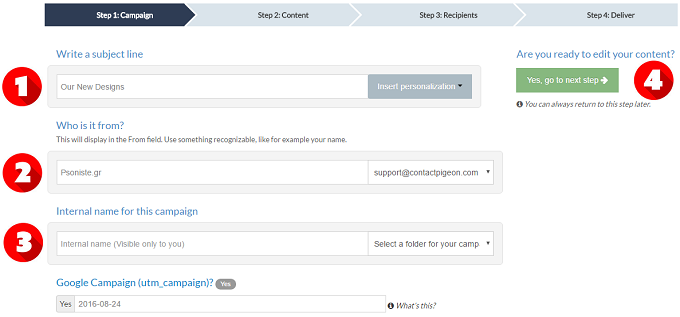
Step 1: Campaign
-
Write a subject line
-
Write the display in the From field
-
Write an internal name (visible only to you)
-
Go to Step 2
Step 2: Content
-
Select how you want to create your email
-
Watch the tutorial video of our new Editor
-
Go to Step 3

Step 3: Recipients
-
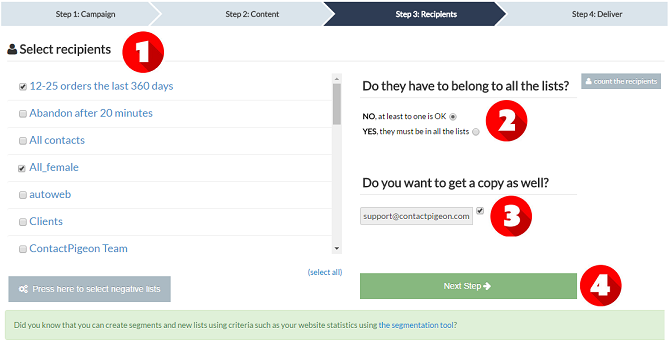
Select recipients
-
Select if you want the recipients to belong at least to one list or must belong to all the selected list
-
Select if you want a copy as well
-
Go to step 4
Step 4: Deliver
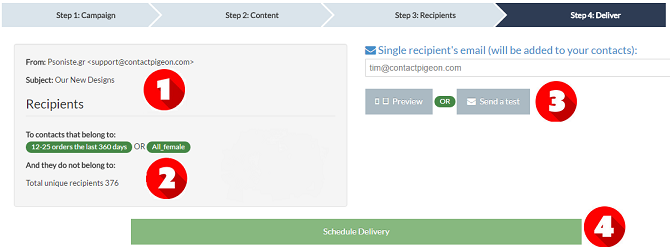
- Check subject line - Check the display in the From field
-
Check the recipients
-
Add single recipient's email if you want
-
Schedule the delivery
Final Step
-
Choose to Send it immediately or schedule it to be delivered at a future time. Press “Send” button.
